
When you click on the add new icon from the Guests & Crew List, this page slides up from the bottom of the screen:
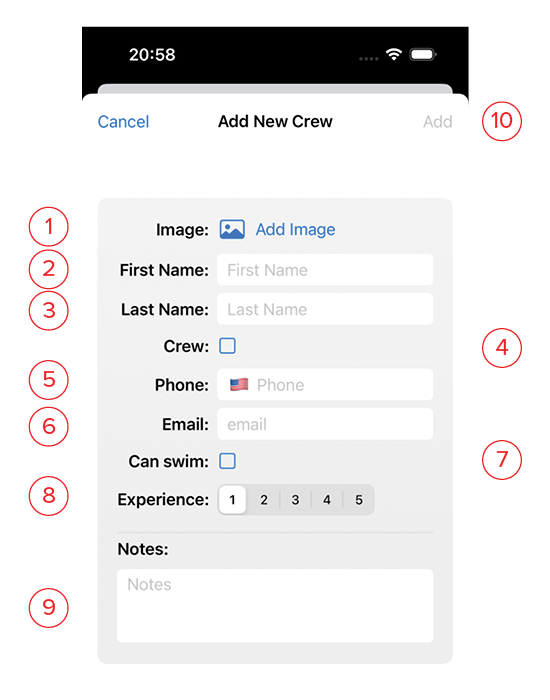
- Click here to add an image is desired. This will let you select a photo from your photo album. If you want a different photo, or no image at all, click the red X over the image thumbnail to delete it, then select a different image.
- First Name: The given name of the person.
- Last Name: Their surname.
- Crew: Tick this box if they are crew and not a guest (this is equivalent to swiping right on their name on the list page)
- Phone: Their phone number. Clicking the flag will change the format to match a country’s standard telephone format.
- Email: Their email address.
- Can Swim: Tick this box is the person knows how to swim.
- Experience: Choose a number from 1-5 of how experienced they are onboard a boat. 1 for newbie, and 5 for old salt.
- Notes: Use this space for a detailed description the crew or guest, including any dietary needs, or special concerns.
- Add: This button will turn blue once you’ve entered their name. Clicking this saves it and returns you to the list.