
When you click on the add new icon from the Voyage List, this page appears:
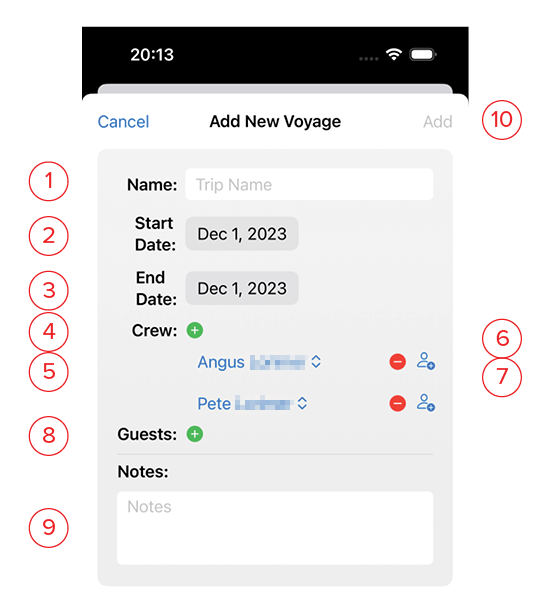
- Name: This is the name of the trip, and will appear in the Voyages List.
- Start Date: Set to the first date of the trip.
- End Date: Set to the last date of the trip.
- Crew: The crew area is pre-filled with those marked as Crew in the Guests & Crew list. Click the green + symbol to add additional crew
- Click on a name to adjust from the available options.
- Clicking on the red – symbol will remove this person from the crew on this voyage.
- Clicking on the person image on the far right will bring up the New Crew screen for adding new people to the app.
- Guests: Click on the green + symbol to add guests to this voyage.
- Notes: Use this space for a detailed description of the voyage.
- Add: This button will turn blue once you’ve given the voyage a name. Clicking this saves it and returns you to the list.