
When you click on an item in the Voyage List this page appears:
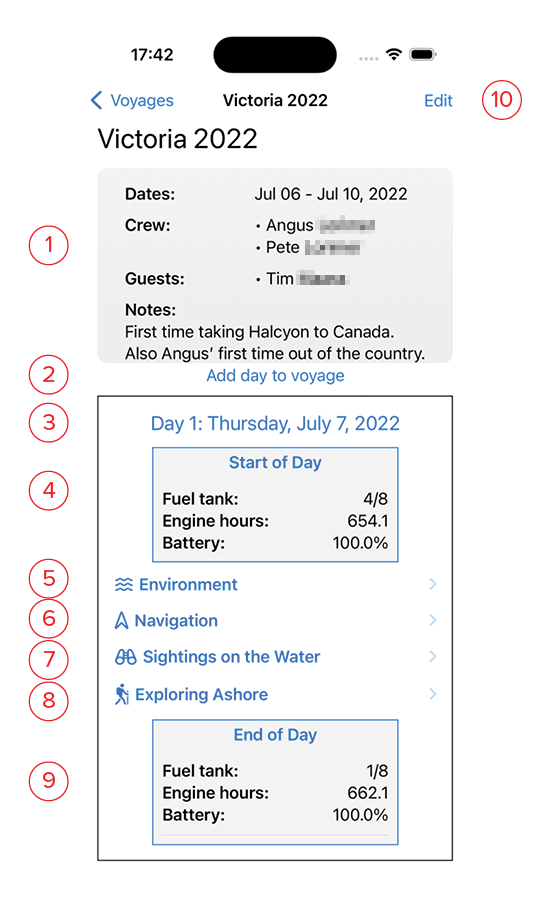
- Info: This is the information entered in the New Voyage screen.
- Add New Day: Each day of your voyage is displayed on a separate page, that may be scrolled through at the bottom of the screen. Clicking this button adds a new blank page for a new day.
- Day: This portion is a Day Page. Clicking on this title will allow you to change the date.
- Start of Day: Clicking on the blue text allows you to set the beginning day values for your fuel, engine and battery bank.
- Environment: Clicking this will show the environment data for the day, including Weather, Tides and Currents.
- Navigation: Clicking this will show the time-stamped log entries for navigation*
- Sightings on the Water: clicking this will display the entries or interesting things you’ve seen along the way.
- Exploring Ashore: Clicking this will show the entries for things you’ve discovered ashore.
- End of Day: Clicking on the blue text allows you to set the ending day values for your fuel, engine and battery bank.
- Edit: Clicking this allows you to change the overall trip information, crew, and description.