
When you click on the Add a day to voyage button on the Voyage Details page, this page appears:
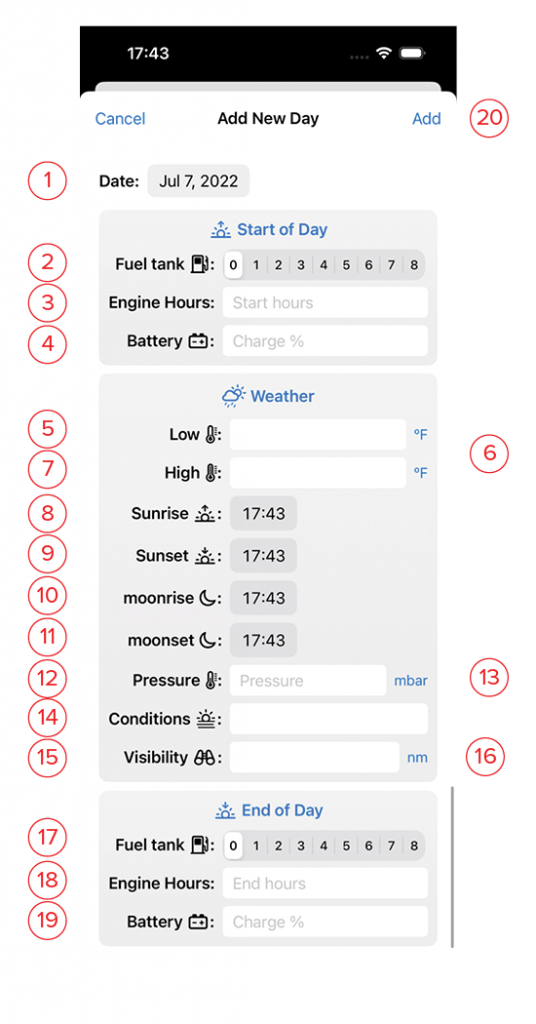
- Date: This defaults to the next day in your trip. you may adjust it as needed.
- Fuel Tank: Level of fuel at the start of the day.
- Engine Hours: Engine Hours at the start of the day.
- Battery: charge level of battery bank at the start of day.
- Low: Forecast or actual low temp for the day.
- Units: If local weather is reported in units different than your customary units, you may change that here by clicking on the blue unit indicator.
- High: Forecast or actual high temperature for the day.
- Sunrise: Time of local sunrise
- Sunset: Time of local sunset
- Moonrise: Time of local moonrise.
- Moonset: Time of local moonset.
- Pressure: Forecast or actual barometric pressure.
- Units: If local weather is reported in units different than your customary units, you may change that here by clicking on the blue unit indicator.
- Conditions: local conditions (e.g. Hazy, Overcast, Clear, etc.)
- Visibility: Distance of clear visibility at sea.
- Units: If local weather is reported in units different than your customary units, you may change that here by clicking on the blue unit indicator.
- Fuel Tank: Level of fuel at the end of the day.
- Engine Hours: Engine Hours at the end of the day.
- Battery: charge level of battery bank at the end of day.
- Add: This button will turn blue once you’ve filled in the information. Clicking this saves it and returns you to the Voyage Details view..