
When you click on the add new icon from the Marina List, this page slides up from the bottom of the screen:
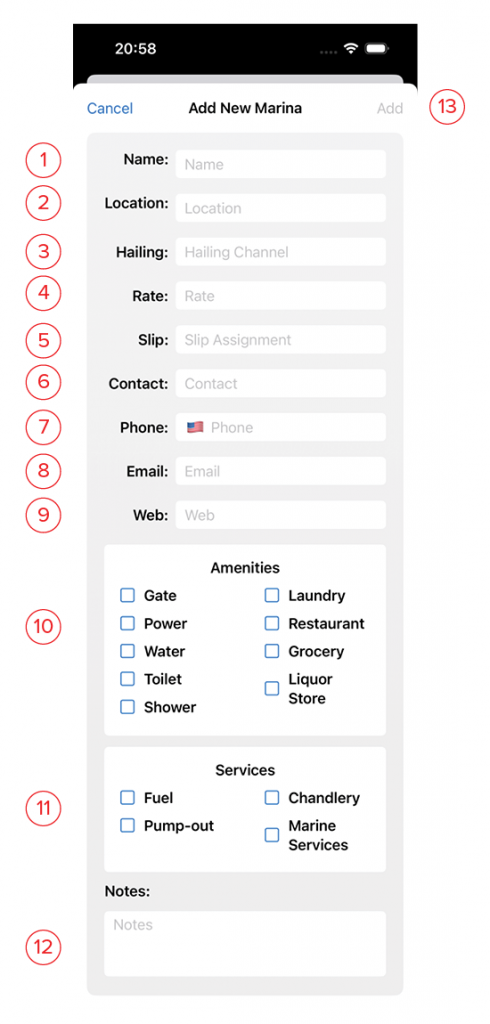
- Name: The name of the marina.
- Location: This is the address, or lat/lon of the marina.
- Hailing: The VHF channel for contacting the marina when you arrive and are looking for a temporary slip.
- Rate: The nightly rate for temporary or long-term moorage.
- Slip: The dock and slip assigned to you.
- Contact: The name of the harbormaster, or marina contact person.
- Phone: The marina’s phone number. Clicking the flag will change the format to match a country’s standard telephone format.
- Email: The email address of the marina office.
- Website: The web address for the marina. This should be the complete address including https:// in order for it to become a clickable link on the details page.
- Amenities: Tick the boxes for the amenities offered at, or near this marina. If Gate, Toilet, or Shower is ticked, appropriate fields for access codes are displayed.
- Services: Tick the boxed for the services offered at or near this marina.
- Notes: Use this space for a detailed description of the marina and any of its facilities, and opportunities to explore ashore.
- Add: This button will turn blue once you’ve given the marina a name. Clicking this saves it and returns you to the list.