
When you click on the add new icon from the Anchorage List, this page slides up from the bottom of the screen:
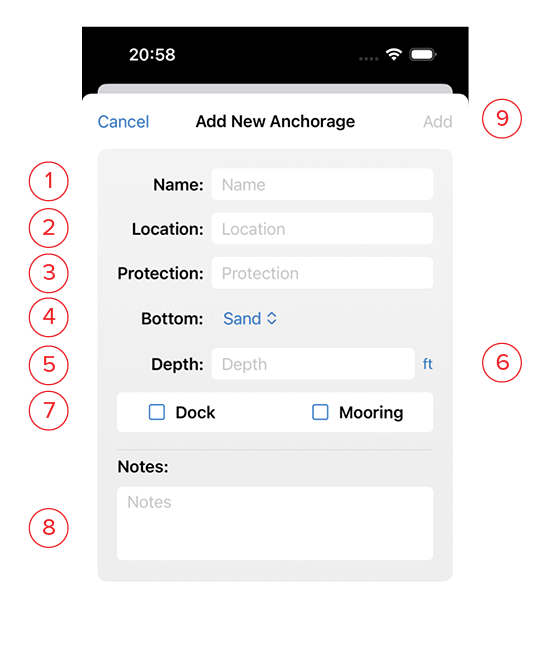
- Name: The name of the anchorage.
- Location: Name of the island, inlet, bay, or lat/lon of the anchorage.
- Protection: Add notes of which wind directions this anchorage is good for, and which it doesn’t protect from.
- Bottom: Choose the bottom type from the drop-down list. Choose from: Sand, Mud, Clay, Shells, grass, Kelp, Rocky, Coral, Boulders, Oysters, Mussels, Mixed.
- Depth: The average anchoring depth at mean low tide.
- Unit: If you are in a country that uses a different unit standard than your customary units, you may change that here by clicking on the blue unit indicator. If you plan to be in a country with different units from your own for an extended period of time, you may make a long term change on the Units page. The depth will always be converted to your own preferred units on the detail page.
- Amenities: Tick the boxes for amenities at this anchorage, including dinghy dock and mooring balls.
- Notes: Use this space for a detailed description of the anchorage, and opportunities to explore ashore.
- Add: This button will turn blue once you’ve given the anchorage a name. Clicking this saves it and returns you to the list.