
When you click on the add new icon from the Settings this page slides up from the bottom of the screen
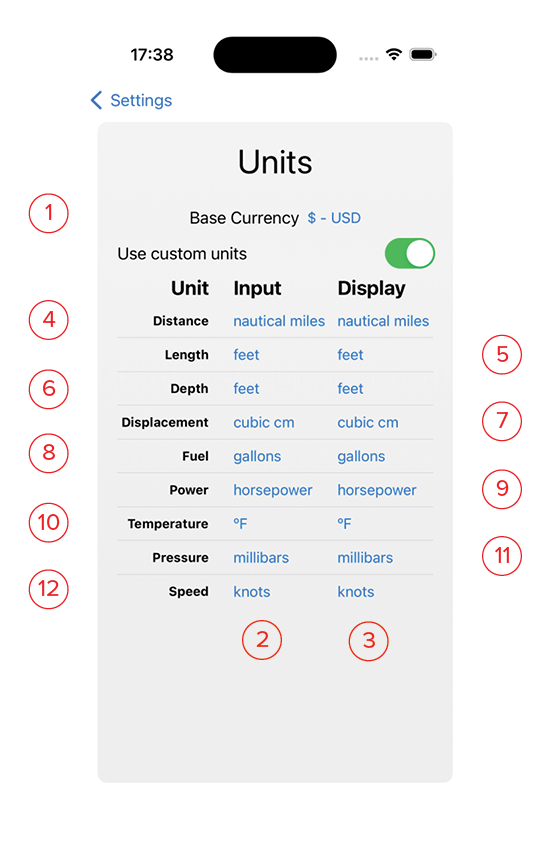
- Base Currency: Enter your home currency here. All prices shown throughout the app will be computed in this currency. Choose from 112 world currencies.
- Custom Units: Toggle this switch to use custom units for input and display. Otherwise the app will use the standard units as set by your country code in the Settings app.
- Input: This column sets the base units for entering data throughout the app.
- Display: This column sets the base units for reporting in the Details views. Most times these two columns will be the same. However, if you are in a foreign country for an extended period, you may want to change the input units to the standards used in that country.
- Distance: Units used for long distance. Choose from the following in the drop-down list: Nautical Miles, Kilometers, Miles.
- Length: Units used for shorter measurements Choose from the following in the drop-down list: Meters, Feet.
- Depth: Units used for vertical distance under the water. Choose from the following in the drop-down list: Meters, Feet, Fathoms.
- Displacement: Units used for engine size. Choose from the following in the drop-down list: Litres, Cubic Centimeters, Cubic Inches.
- Fuel: Units used for fuel volume. Choose from the following in the drop-down list: Litres, Gallons, Imperial Gallons.
- Power: Units used for energy. Choose from the following in the drop-down list: Horsepower, Kilowatts..
- Termerature: Units used for temperature. Choose from the following in the drop-down list: Celsius, Fahrenheit.
- Pressure: Units used for barrometric pressure. Choose from the following in the drop-down list: Millimeters of Mercury, Inches of Mercury, Millibars.
- Speed: Units used for boat and wind speed. Choose from the following in the drop-down list: Meters/Second, Miles per Hour, Kilometers/Hour, Knots.