
When you click on the add new engine icon from the Vessel Details view, this page slides up from the bottom of the screen:
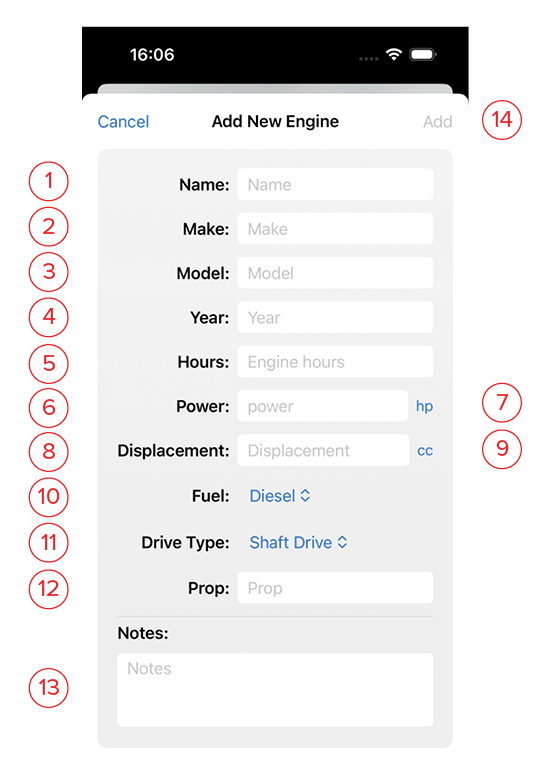
- Name: The name of the store.
- Make: Manufacturer of engine
- Model: Specific engine name/number
- Year: Year engine was manufactured
- Hours: Current engine hours
- Power: Engine crank power
- Unit: If your boat’s measurements are in a different system than your customary units, you may change that here by clicking on the blue unit indicator. Selector options: horsepower or kilowatts
- Displacement: Engine volume.
- Unit: If your boat’s measurements are in a different system than your customary units, you may change that here by clicking on the blue unit indicator. Selector options: cubic inches, cubic centemeters, or litres.
- Fuel: The type of fuel the engine takes. Choose from the following in the drop-down list: Diesel, Petrol, Electric, Other.
- Drive Shaft: Choose from the following in the drop-down list: Outboard, Stern Drive, Shaft Drive, Sail Drive, Other.
- Prop: Enter your prop size, brand, etc.
- Notes: Use this space for a detailed description of the engine, filter size, oil type, etc.
- Add: This button will turn blue once you’ve given the chandlery a name. Clicking this saves it and returns you to the list.